
Skip to content

v0.6.0Download

Get Tidemark.

For Windows, free from the Microsoft Store, which signs every version and installs updates for you. A native Mac version is coming soon.

01Spec

System requirements

One app, two systems. A Tidemark Pro key works on up to 3 devices, Windows or Mac.

available now

Windows

v0.6.0 · 19 October 2026

Windows
Windows 10 version 2004 (build 19041) or later, or Windows 11
Processor
x64 (64-bit Intel or AMD)
Fast scan
An NTFS drive, the default for Windows drives
Signed by
The Microsoft Store, which also installs updates
get it from theMicrosoft Store

coming soon

Mac

not released yet

macOS
macOS 15 Sequoia or later
Status
Coming soon, not released yet
Tidemark Pro
The same key as on Windows: up to 3 devices at a time, in any mix

Tidemark for Mac is a native app with the same features as on Windows, apart from a few that only exist on one system, plus a menu bar extra, Quick Look, a sunburst view and APFS-aware cleanup. There is no download until it is released. If you buy Tidemark Pro now, the same key will work on your Mac.

coming soon for macOS

Get Tidemark Pro now

02Install

Up and running on Windows in a minute

  1. 01

    Get it from the Microsoft Store

    Open the Store listing and choose Get. The Store installs Tidemark and keeps it up to date.

  2. 02

    Open Tidemark

    Find it in the Start menu. The Overview reads your drives straight away; no account, no sign-in.

  3. 03

    Scan a drive

    Choose Scan on a drive, or open Explore. The first scan of C: usually takes a minute or two.

  4. 04

    Optional: activate Pro

    Buy Tidemark Pro, then paste the key from your email into Settings › Tidemark Pro.

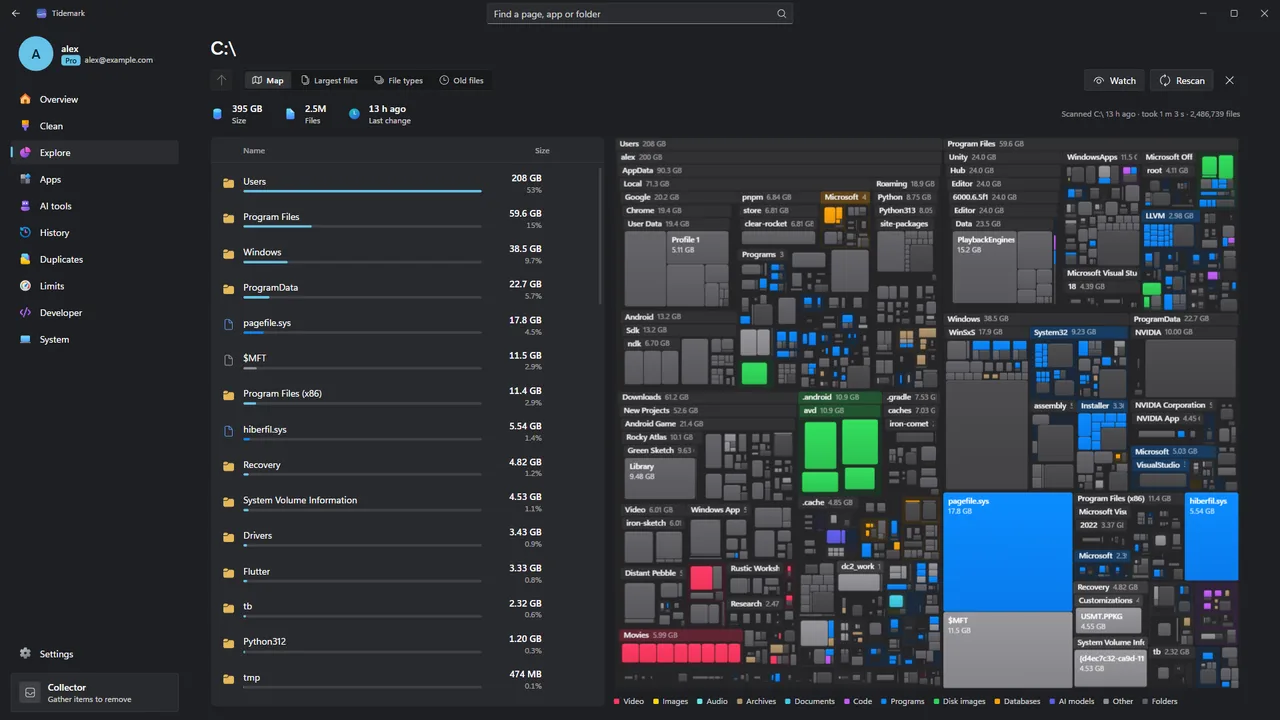
Tidemark Explore: a treemap of a drive beside a list of folders sorted by size.
fig. 1 — ExploreExplore any drive as a treemap and a size-sorted list.

03Permissions

What Tidemark asks Windows for, and why

The Store shows these as the app’s capabilities. Here is what each one is used for.

  • 3.1

    Full trust

    Tidemark is a desktop app, so it can measure folders on every drive and read the list of installed programs.

  • 3.2

    Administrator, only when you ask

    Fast scan, cleaning Windows’ own space with Microsoft’s tools and uninstalling a program installed for all users show a Windows permission prompt each time.

  • 3.3

    Real cleanups under AppData

    Tidemark turns off the Store’s file virtualization, so clearing another app’s cache under AppData frees real space instead of a private copy.

  • 3.4

    Optional scheduled tasks

    Daily snapshots and the hourly check are per-user scheduled tasks you turn on yourself. No services and no drivers.

04Uninstall

Uninstalling Tidemark on Windows

If you turned on daily snapshots or the hourly check, turn them off first so their scheduled tasks are removed. Then open Settings › Apps › Installed apps, find Tidemark and choose Uninstall. Your history and saved scans stay in %LOCALAPPDATA%\in.thryveapps.tidemark until you delete that folder.

If you use Tidemark Pro, deactivate the PC in Settings › Tidemark Pro first, so the activation can be used on another device.

05Questions

Before you install

01Which versions of Windows does it run on?

Windows 10 version 2004 (build 19041) or later, and Windows 11, on x64 PCs. Fast scan needs a drive formatted as NTFS, which is the default for Windows drives.

02Is there a Mac version?

It is coming soon. Tidemark for Mac is a native app for macOS 15 or later, with the same features as on Windows apart from the few that only make sense on one system. It is not released yet. A Tidemark Pro key will work on it too: one key covers up to 3 devices at a time, in any mix of Windows PCs and Macs.

03Where do I get it?

On Windows, from the Microsoft Store, which signs and updates it; the download page links to the listing. The Mac version will be on the download page when it is released.

04Does it run in the background?

Only if you turn it on. On Windows, daily snapshots and the hourly check are optional per-user scheduled tasks that take a few seconds and show no window. Tidemark installs no services and no drivers.

05Why does Windows ask for administrator permission?

Only for three things you start yourself: Fast scan (reading the Master File Table needs it), cleaning Windows’ system space with Microsoft’s tools, and uninstalling a program installed for all users. Tidemark never asks for it on its own.

06Where does Tidemark keep its data?

On Windows, in %LOCALAPPDATA%\in.thryveapps.tidemark: the history database, remembered scans and a log. Uninstalling Tidemark from Windows removes the app; you can delete that folder to remove its data too. The Mac version will keep its data in ~/Library/Application Support/Tidemark and its log in ~/Library/Logs/Tidemark.

→Get Tidemark

See where your space went.

Free to use, with no time limit. Tidemark Pro is $9.99 once (usually $19.99), for up to 3 devices, Windows or Mac.

Windows 10 (version 2004, build 19041) or later and Windows 11, on x64 PCs.
Mac, coming soon: macOS 15 Sequoia or later.